Free Notion Task Template: What You Actually Get
Notion task template free: what a free template includes, which Free plan limits break one, and a ten-minute test to run before you duplicate.
By Notion Task Manager by Cosmo Suite · Editorial policy
Published · 11 min read
A free Notion task template usually works on day one. It fails later, and rarely because of its own design. Three things break it: a Free plan cap nobody checked before duplicating, a view the template never shipped, and a setup that stopped half finished on the second afternoon.
Search for a free task template and page one is a wall of lists, most of them numbering other lists. What none of them gives you is a way to tell, before you duplicate, whether the thing will still be there in week two. That is the test this guide sets up: what a free template actually contains, the plan limits that break one, and a ten-minute check you can run on any candidate.
A free Notion task template is a task database with preset properties, one or more saved views, and an add path, shared for no charge. The charge sits in the plan limits around it, not in the file.
Key Takeaways
- A free task template is three parts: a database, its views, and the way a task gets added.
- The Free plan block cap applies to workspaces with more than one member, not to single-member workspaces.
- A template can be complete and still fail, if its add button uses an action your plan does not include.
- Ten minutes of testing with three real tasks tells you more than any roundup.
- The parts that decide survival are choices you make after you duplicate.
What Does a Free Notion Task Template Actually Give You?
A free Notion task template gives you three things: a task database with preset properties, one or more saved views, and a way to add a task without rebuilding the page. The rest is decoration, and most of it you can add later.
Notion describes database templates as a way to "define and replicate certain page structures with one click." It also notes that a template can preset properties and page content. The promise is the same starting page every time, which sends your attention to the work instead of the setup.
The Database and Its Properties
The database is the part that lasts. A task template sets the properties you fill for every task. Usually that is a name, a status and a date, and sometimes a project relation, for example a priority. A database template is a saved page layout inside one database, so every new page made from it starts with the same properties and body content. Notion's database templates guide adds one caveat on relations. A relation filled inside a template relates every page made from it to the same record, so leave it empty unless that is what you want.
The Views
Views are filters over the same database, not separate lists. A useful free template ships two or three, such as open tasks, tasks due today, and something for late work. A view is a saved set of filters, sorts and groups applied to a database without changing the data underneath it. Each view keeps its own settings. A template with six views hands you six sets of filters to keep in step.
The Add Path
The add path is how a task enters the system. An add path is the single route a new task takes into the database, whether that is a database template chosen from the New button or a button that inserts blocks and creates a page for you. Notion's template buttons page says buttons work on all plans, but some button actions need a paid plan. A template whose add path uses a paid action looks complete on a paid workspace. On Free it feels broken.
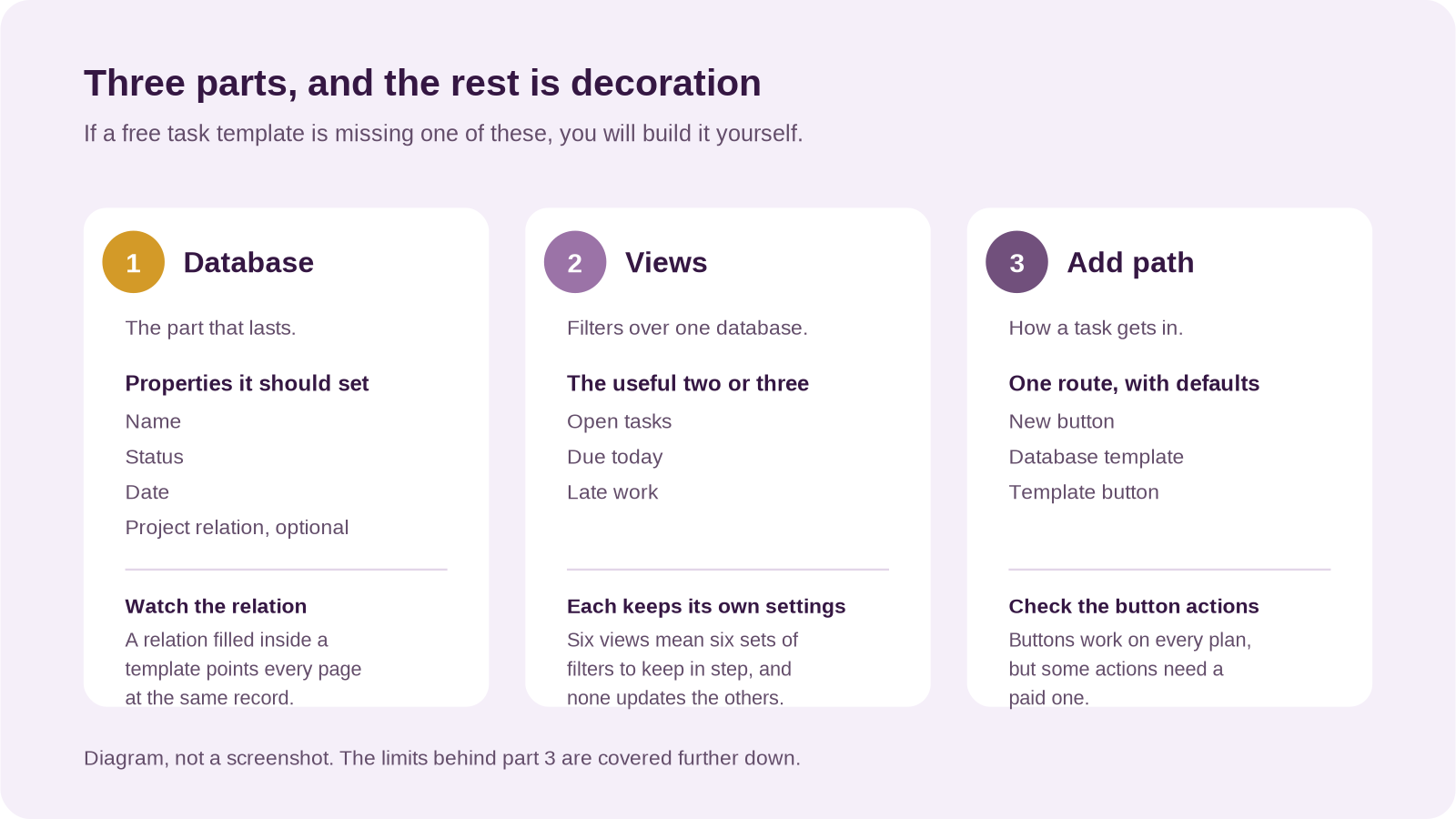
The diagram shows the three parts a free task template is built from. It is an illustration, not a screenshot.
Free Template, Your Own Build, or Paid Template?
A free template wins when its structure already matches the week you actually have. Building your own wins when that structure is obvious and small enough to finish in a single afternoon without further decisions. A paid template earns its price only when the part it removes is the part you would have struggled with on your own, which is usually the dashboard rather than the database. You can see what a prepared Notion Task Manager setup includes if that comparison is the one you are making.
| Your situation | Free template | Build it yourself | Paid template |
|---|---|---|---|
| You need a working list today | Fastest path, if the views fit | An afternoon of setup before the first task | Fast, but you pay before you know it fits |
| You already know your fields | Good, if the template has them | Fine, and you keep full control | Extra cost for a decision you already made |
| You want one dashboard | Hit or miss; check the home page | Possible, but it is the hard part | Usually the thing you are buying |
| You may outgrow it | You can edit everything you added | You can grow it as you go | You pay again for a bigger setup |
| Your workspace has several members | Check the block cap first | Same cap applies | Same cap applies |
Best for: a free template when your task list is small and the views already answer your questions. What you give up: the prepared dashboard and the setup notes, unless the template includes them.
Take a case. You have twelve open tasks across three areas of work, and you want to see today's items without scrolling past the rest. A free template with a today view handles that in one click. A free template with only one unfiltered list does not. No amount of editing fixes that in the minute you have on a Monday morning.
Which Free Plan Limits Break a Duplicated Task Template?
Three Free plan limits can break a duplicated task template. They are the 1,000-block cap on workspaces with more than one member, the 5 MB file upload cap, and buttons limited to basic actions. None of them is about the template's quality; all three are about the workspace it lands in.
| Limit | What Notion states | What it does to a task template | Check before you duplicate |
|---|---|---|---|
| Blocks | 1,000 blocks per workspace on Free with more than one owner; unlimited with a single member | A large template can use a real share of the cap, and new content stops when the cap is reached | Count what the template adds, then compare with your current usage |
| File uploads | Up to 5 MB per file on Free | Cover images and attachments inside the template may not upload | Check the size of any image the template ships |
| Buttons and automations | Buttons on all plans, with some actions paid only; Free lists "basic buttons only" | An add button built on a paid action will not behave the same | Try the add path once on your own plan |
| Page history | 7 days on Free | You cannot roll back a bad edit made last month | Decide how much history you need before you restructure |
| Guests | 10 external guests | A template shared with a client group can hit the limit | Count the people who need access |
The block cap is the one people miss, because it depends on who else is in the workspace. Notion's block usage page says single-member workspaces have unlimited blocks, while a Free workspace with more than one owner is capped at 1,000 blocks. It also says deleting blocks does not reduce the count, and that editing existing content still works after the cap. A big template on a shared Free workspace can therefore leave you able to edit what you have and unable to add more.
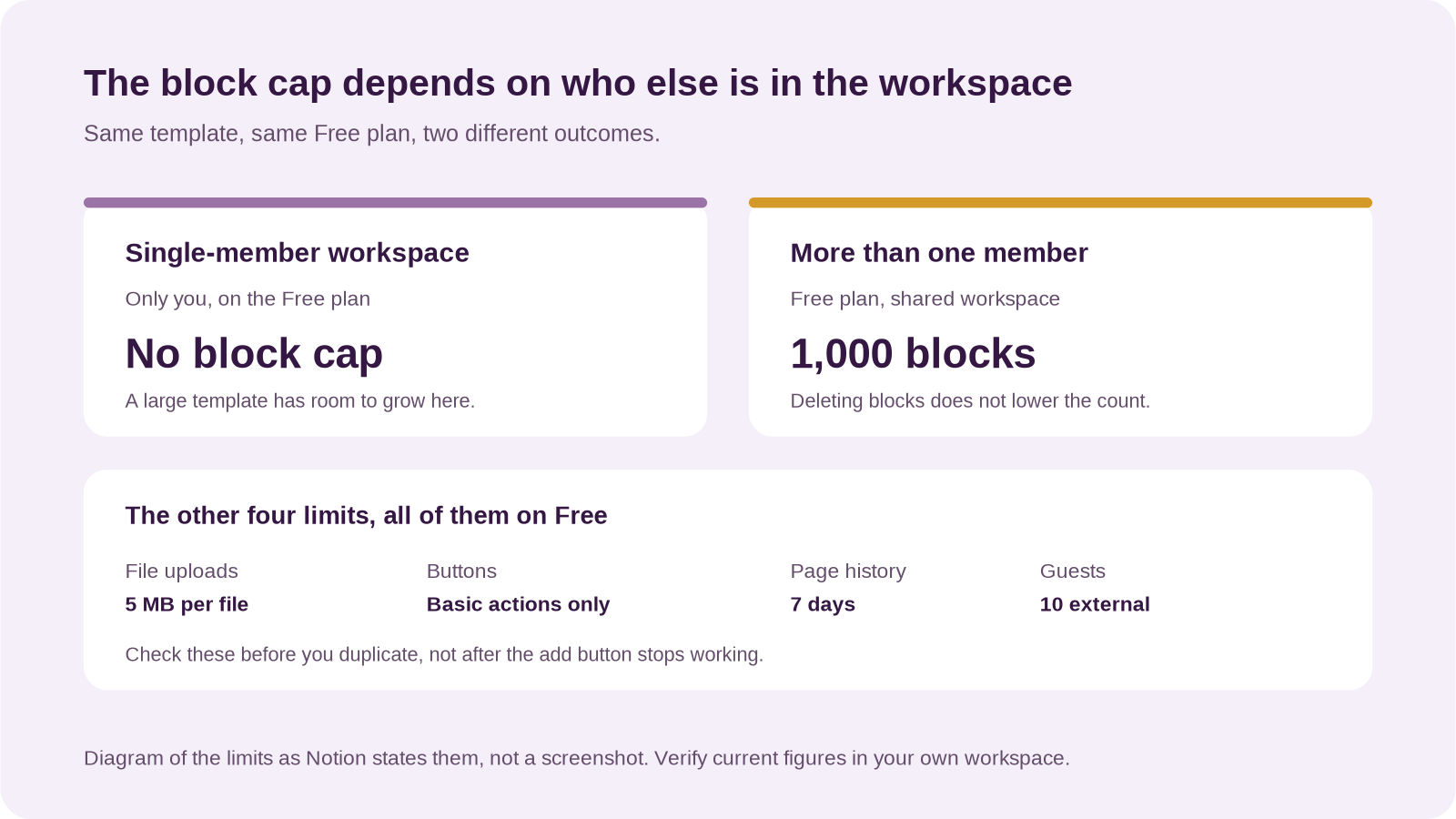
The diagram compares the two Free plan cases. It is an illustration of the stated limits, not a screenshot.
A Ten-Minute Test Before You Duplicate
Run three real tasks through the template before you commit to it. The pass condition is simple: a week later you find those tasks in the view where you would look for them, without cleaning anything first, and you can start on the first one straight away.
- Add a task with a real name. Not "test task". Use something you actually have to do, so the next steps are honest.
- Set its status and its date. If either field is missing or awkward to reach, that is the first finding.
- Find it in the view you would open on a Monday. If you have to filter, sort or search, the view is not doing its job.
- Mark it complete. Then check that it leaves the open list and still appears where you review finished work.
- Add two more tasks and repeat. One task can hide a gap. Three expose whether the add path works under normal use.
| Result | What you saw | What to do |
|---|---|---|
| Pass | All three tasks appeared where you expected, with no edits | Keep the template and use it for a normal week |
| Partial | The right tasks showed up after a sort or filter you can save | Fix the view, then run the test again |
| Fail | Tasks were missing, mis-filed, or the add path broke | Try another template, or build the small version yourself |
The test is illustrative, not a report about any one template. Its value is that it costs ten minutes and answers the question the listicles skip.
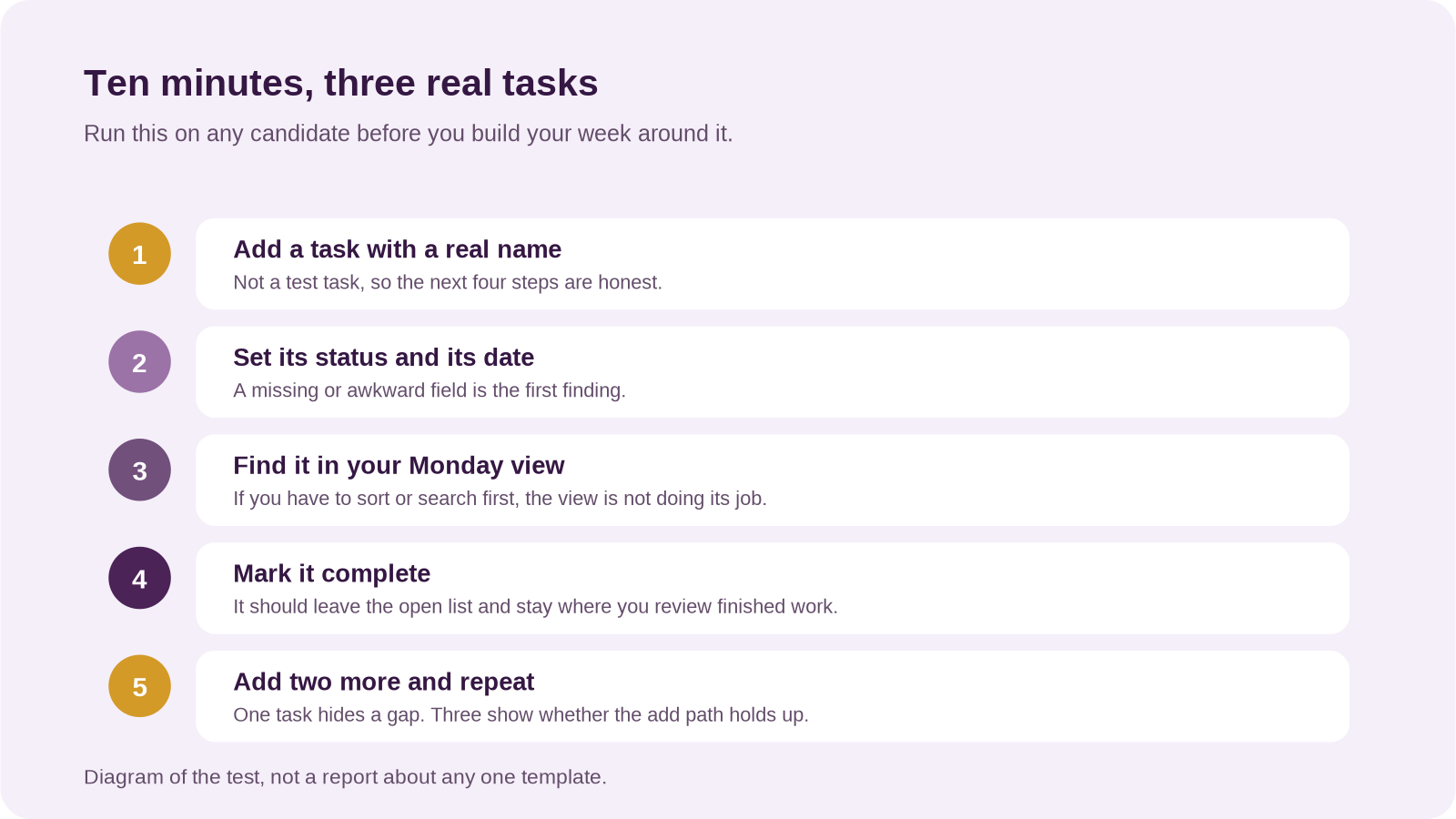
The diagram shows the test path. It is an illustration, not a screenshot.
Where a Free Task Template Stops Being Enough
A free template stops being enough when the missing piece is one you would have to build yourself, because building it is then the work you were trying to avoid. That condition is narrower than it sounds.
When the missing piece is a view. Views are cheap to make and expensive to keep consistent. If the template has the database right and only lacks the today view, add the view yourself. It takes ten minutes and you own it afterwards.
When the missing piece is the dashboard. One page that opens on today's work, with late items in their own list, is the part most free templates skip, and it decides whether you open the page at all. Building one is possible. It is also the piece people abandon halfway.
When the setup is the thing you keep postponing. If you have duplicated three templates and finished none of them, the template is not the bottleneck. A prepared setup with a fixed home page removes those decisions, and that is a different purchase from a longer feature list.
The money question is separate from this one, and it becomes easier to answer once the test above has told you what the template is missing. If you are comparing what a template costs against what a Notion plan costs over the first year, free vs paid Notion task templates covers that decision without repeating this test.
What Actually Decides Whether a Free Template Survives Week Two
Five things decide it, and four of them are choices you make after you duplicate, not features you shop for.
One database. Every task lives in one place. A template that scatters tasks across a note, a staging page and a database gives you three places to check and two that you will inevitably forget to open.
Three views at most. Open, today, late. Each extra view is another set of filters to keep correct, and Notion keeps view settings separate, so they never update each other when the database changes.
One date that means one thing. The date is when the work is due. If a task needs a work window and a deadline, that belongs to the project, not to every task. The task database setup guide walks through the minimum fields if you are building this part yourself.
One add path with defaults. A button or template that sets the status and the date removes the two decisions behind most misfiled tasks, for example a task with no owner and no due date. If the button route is new to you, the one-click task button guide shows what the defaults should carry.
One weekly reset. Ten minutes, once a week, on the tasks the views cannot place. Without it, gaps accumulate until the page needs a rebuild. The low maintenance task manager guide turns this into a countable test.
None of these five needs a purchase. A prepared setup simply ships them already in place, which is the difference between a Notion Task Manager you open on day one and a database you finish next weekend.
A free template that gets these five right is not worse than a paid one, and a paid template that gets them right simply saves you the setup. Either way the levers are the same, and none of them shows up on a Marketplace listing, which is why the listing cannot answer the question you are actually asking.
Why Trust This Article
This guide was written by the Cosmo Suite team, which builds Notion templates, including the Notion Task Manager referenced here. The Notion behaviour described comes from Notion's own help pages for database templates, starting with a template, block usage, template buttons and the Marketplace, plus the current pricing page. All were checked on 2026-11-21 and are listed in the sources above.
All task names and counts in the test are illustrative, and the images are diagrams rather than screenshots. Notion changes its interface and plan limits, so verify the current figures in your own workspace before you rely on them. Read About us for the publisher. Use the contact page to report a correction, and see the editorial policy for how articles are prepared.
Where Notion Task Manager Fits
The test above asks for a template whose views already answer today's question. It also asks for a workspace that survives a bad week without a rebuild. Notion Task Manager is one Notion template built around that starting point.
It has a Home dashboard and 9 linked areas: Tasks, Projects, Meetings, Goals, Time tracker, Contacts, Resources, Feedback and a setup guide page. Home opens on the Agenda. Due Today comes first, Upcoming shows what is next, Overdue has its own list, and tasks with no date wait in Unscheduled. Quick Actions add a New Task, Project, Meeting, Goal or Contact in one click, already in the right place. Sample tasks, a sample project and a sample meeting are filled in as an example. It runs on the free Notion plan.
What it does not do matters for the test: there are no automations, reminders or notifications beyond what Notion provides, and no built-in calendar sync, so meetings and due dates live in the template's own calendar views. It is built for one person's work, so there are no team or client features.
The outcome is the pass condition from the ten-minute test. Open one page, see today first, add a task in one click, and find late work in its own list. You can review the full contents of the Notion Task Manager template and compare it with the free template you are testing before you decide. If today's view is the part you are missing, the Notion today view guide explains the filter behind it. The pillar guide covers which fields are worth keeping at all.
Frequently asked questions
Is a free Notion task template really free?
The template is free. Your workspace still runs on a Notion plan, and the Free plan has limits that matter for a duplicated template. Check the block cap, the file upload size and the button actions before you rely on one.
How many blocks does a free Notion task template use?
That depends on the template. A single-member Free workspace has no block cap. A Free workspace with more than one member is capped at 1,000 blocks, and Notion says deleting blocks does not reduce the count, so check usage before you duplicate a large template.
Can I use a free task template on the Notion Free plan?
Yes. Free templates can be added from Marketplace or duplicated from a shared page, and Notion says an added template can be duplicated in that workspace. The limits to watch are blocks, upload size and which button actions work on Free.
What is the difference between a database template and a duplicated page?
A database template is a saved page layout inside one database, so every new task starts with the same properties and body. A duplicated page is a copy of a whole page in your sidebar. The first suits repeated tasks, the second suits a one-off setup.
How do I test a free task template before using it?
Add three real tasks, set a status and a due date on each, find them in the view where you would review work, then mark one complete and confirm it leaves the open list. If any step needs a repair you cannot make in a minute, the template is not finished.
When is a free task template not enough?
When the missing part is a view, a relation or a default you would have to build yourself, and building it is the work you wanted to avoid. A paid template earns its price when it removes that setup, not when it adds more properties.
Sources
Keep reading
Task Management
Notion Task Manager: What to Keep and What to Skip
notion task manager: Learn which task fields and views earn their place, what you can skip, and when a ready-made Notion setup makes sense.
· 8 min read
Task Management
Free vs Paid Notion Task Templates: What Should You Pay For?
free vs paid Notion task templates: Compare task views, setup effort, and plan limits with a practical checklist before you duplicate or buy.
· 8 min read
Task Management
Notion Task Database Setup: The Minimum Fields to Start
notion task database setup: pick fields that guide your next action, start with a usable task list, and add views when you need another way to review it.
· 10 min read
